Tag usability

Change layer content in PS CS4.

Or rather, someone please change Adobe’s mind. Today I spent some time looking online for what’s changed in the latest version of Photoshop (CS4). Along with numerous improvements across the board, I stumbled on a number of posts in forums and a few blogs on the ‘Change layer content’ menu removal. This is unbelievably bad […]

Tales of Bad Design: The new Ionising Radiation symbol.

In February 2007, ISO and the IAEA created a new symbol for Ionising Radiation that complements (see “partially replaces”) the classic trefoil that’s been in use for more than sixty years. The new symbol is a red triangle with a black border that contains the trefoil, a number of jagged edges emanating from it and […]

Five GNOME/Linux Desktop Issues

GNOME, one of the two main linux desktop environments and platforms has become a very popular choice adopted by most major distributions as their desktop of choice, mostly due to its simplicity and minimalist design. While it does several things ‘right’, by generally providing a straightforward experience and ‘hiding’ advanced configuration options in its gconf […]

Resampling Needed

Those using Firefox 3.0 may have noticed that by default when someone scales the content of a page, the images are resized too, a behaviour long-pioneered by Opera. Those using Firefox 3.0 on linux will be sorry to find out that upscaled images are not resampled using anything but what seems to be nearest neighbour (I haven't checked the code): they are ugly, pixelated and definitely not pleasant to the eye. This is well documented on the Mozilla Bugzilla repository and sadly it may be the case that it's not fixed until Firefox 3.0 final is out. Which is a shame, as many people with higher resolution displays, especially high-resolution laptop displays that sometimes reach approximately 150dpi actually depend on the scaling functionality to be able to read stuff properly. Ironically GTK+ offers pretty decent image scaling functionality and hopefully it's not that hard to make use of it in Firefox in the near future. Here's an illustration of the problem. The picture on the left shows the original (unscaled) content of the ΜΠΛΟΟΓΚΛ hellenic blog search engine. The one in the middle shows the scaled version, as shown in Firefox 3.0 Beta 5 that shipped with Ubuntu 8.04. The one on the right shows a resampled version of the image using the (pretty computationally expensive) lanczos algorithm, which although not probable as a solution it's quite close to the (realistically possible) bilinear resampling for upscaled images of this size. Image Upscaling in Firefox 3.0B5 (Linux) You can follow the progress on this issue on the Mozilla Bug tracking page here.

Today Webkit is on ACID!

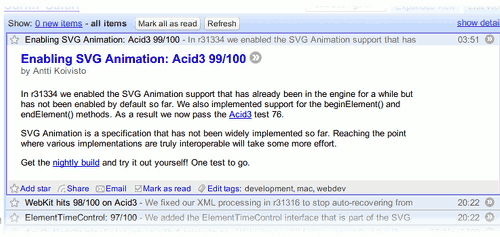
The following image says it all really: Webkit ACID3 bugfixes These past few days there's been a flurry of WebKit posts over at Surfin' Safari about its ACID3 performance. I guess when dealing with bugs, and given the fact that Microsoft typically needs around 5 years before simple CSS1 bugs are fixed (as an aside the first and only version of Internet Explorer to date that passes ACID2 is 8 Beta 1, released a couple of weeks ago), I was surprised to see how fast the WebKit developers worked towards passing the ACID3 test. Between 20:22 and 03:51 another three ACID3 bugs were fixed, taking the score to 99/100. I guess by tomorrow WebKit will officially be ACID3 compliant. Woohoo! By comparison, Firefox 3.0 Beta 4 that I'm using to write this post in Ubuntu Hardy Heron Beta1 scores a somewhat respectable 68/100, although I don't think they'll pass ACID3 before the final version is out.

A Facebook Survey

I'm sure not too many within the Facebook userbase share my disdain for closed, proprietary networks yet it is not surprising that a significant number of erstwhile facebook fanatics are getting tired of the same old pointless application craze that more or less defined the latter part of 2007 for the network. On the other hand, with OpenSocial having not made any substantial steps towards a concrete presence on the internet and Yahoo's efforts having completely failed in terms of public adoption and awareness, Facebook remains the one, more or less universal social networking platform and by and large the one with the vast majority of third party applications and meaningful population profiles. I have written about my personal use of the network before: to me it's merely a universal 'phonebook' where I can find old schoolmates, long lost friends from university or other activities and friends of friends that I never got the chance to get to know well enough, but that were somewhat interesting to merit a basic level of communication. I don't use any of its facilities, not even the basic stuff like messaging (what's the point? email is much better). It is, in my eyes, merely a directory of people, not a platform for communication. Yet others have used it in considerably different ways: from meeting new people, to 'wasting' time using pointless applications, to showcasing their photographs or communicating. The University of Bath has a short survey regarding the use of Facebook. The survey is available in several languages and can be found here. It will probably take less than 5 minutes of your time. Τhe results of this survey are going to be published online after the survey and accompanying analysis are completed.


Injury to Insult.

One of my main annoyances with OS X since 10.0 was Terminal.app. My UNIX background requires a decent terminal application and Terminal.app more or less traditionally embodied everything that can possibly be wrong with a terminal application. Up until Leopard, Apple had paid little attention to it and many people had forsaken it for applications such as iTerm. Sadly I never quite liked iTerm, I don't fancy starting X11 up just for the terminal and so I ended up tolerating Terminal.app and hoping that Apple would fix it in the future. I couldn't --- and still can't --- understand how Gnome and KDE provide so much more powerful terminal applications and Apple, the goliath of usability and design, provides such a ridiculous terminal. Or can I? In Mac OS X Leopard, Apple revamped its terminal application. Unfortunately the revamp is nothing but insulting to those people that are most probably going to be using it the most. One of the longstanding issues with the previous versions was the inability to set the ANSI colours so that coloured text could be legible under dark or light backgrounds. In 10.5 Apple has introduced several 'themes', including a number of dark themes provided by the company, (viz. 'Pro'), that use dark backgrounds. Yet actually using those themes is practically impossible with the OS X default ANSI colours and there's no way to change these colours: they are still hard-coded in the binary. The usual solutions are still there, using InputManagers, SIMBL etc. or giving up on Terminal.app and switching to another terminal application, yet so is my dislike for any of those solutions. Given the work that Apple has clearly put in providing the 'theming' functionality --- including a wholly new configuration system and theme inspector it's quite perplexing why they 'omitted' providing support for setting the ANSI colours given that it's been one of the most commented upon, criticised omissions of this application for the past six years. If anything it seems to me like Apple is taunting its users with such ridiculous 'improvements' and the completely needless attention to detail (e.g. 'live' thumbnails on the terminal inspector!), while it ignores real problems faced by those that make use of its software.

Leopard UI flaws

Apple likes showing off. In Leopard lots of things are improved, the UI is more consistent and polished. Yet there are a number of completely ridiculous aspects of it that go quite a long way towards demolishing Apple's reputation as a leader in UI design. Take for example the new Dock, which besides completely pointless is also an ergonomic nightmare, heavy on resources and ugly. Did I mention pointless? (Thanks to the_unknown_Apple_dev for the no-glass option!). The linked blog entry more or less sums up most of the things I found completely, utterly stupid while looking at Leopard images and videos online. I've got some more, such as the relatively dark gray 'platinum' look (I prefer the lighter gray of the 'inactive' windows), CoverFlow (mostly useless in the Finder if you ask me), the proliferation of etched text among others. [via daring fireball] Update: As usual, a really good and thorough review of Leopard by John Siracusa, can be found at ArsTechnica.

LinuxMCE and Usability

Some months ago I discovered LinuxMCE, a software suite that sits on top of Kubuntu and provides a complete media centre/smarthome/voip/home security solution with truly world class features. I got to rediscover it in mid September this year after I watched this demonstration video. The project is impressive with its rich feature list, its expandability […]

Ximian Gnome — Linux Desktops

I recently tried Ximian Gnome 2. What do I think? Well, it is definitely a good try, but it is very similar to the Gnome desktop I had on my machine more than 18 months ago. I don’t know whether it is me or it is really happening, but I find the Linux Desktop developments […]