2011.03.25

My Ten Years With Mac OS X.

Mac OS X 10.0 (Cheetah)Ten years ago, on March 24th, 2001, Mac OS X came out. A first, publicly available, one point oh unpolished version of Apple’s ‘next’ (pun intended) operating system. An operating system that Apple had been trying, in one way or another, to create for more than ten years. Remember Pink? Taligent? Copland? Gershwin? Mythical codenames to those that heard of them in the 1990s of either projects that promised amazing experiences compared to Mac OS Classic and that were never finished or released as planned, or spun-off products that died after a few short years. Mac OS X, what finally became a cornerstone of Apple’s platform well beyond the Mac and a catalyst of its success in the 2000s was a reincarnation of NeXTSTEP in Apple’s colours. Fusing NeXTSTEP’s core and frameworks with the Mac OS of old as one product that didn’t exactly know itself. A new skin, the same — amazingly advanced for their time — underpinnings.

In this short article I will describe, in summary, some experiences with Mac OS X from the point of view of a software engineer as opposed to a user, over the past ten years: The initial chaos of integration, Apple’s flirtation and dilemma with Java, the modernisation of Objective-C, the eventual coherence of the APIs and the extension of the system to support Touch in a way that was never achieved before.

NeXTSTEP frameworks used Objective-C. It was a language unknown to 99% of programmers out there in 2001. I had only heard of it while fiddling with GNUStep a few years earlier. In the early 2000s you could still find C++/Corba programmers in major service companies (as opposed to large software houses or systems development divisions) and Java was only starting, slowly but increasingly, to become the preferred platform for enterprise software. I remember meeting amazing and suitably eccentric software engineers — not merely the subpar ‘developers’ that are increasingly common nowadays in service/enterprise environments — that proudly proclaimed ‘Java is for girls!’ and other elitist, sexist jokes like that. Anything less than Alexandrescu and Sutter-class C++ was unacceptable to them. Knowledge of x86 assembly was standard among their friends. How could a person like that appreciate Objective-C? I felt comfortable hanging out with those people because I had gone through the rings of fire of learning, liking and using assembly, ‘high-level’ [insert CPU here] programming (irony!) and C/C++, but I also enjoyed the elegance and simplicity of Objective-C and Cocoa for rapid application development.
»

2 comments


» There’s no use crying over spilled milk

Yet, that’s exactly what Gruber does in this, brilliant, spot on rant on Snow Leopard’s lack of Creator Code support [or any alternative thereof].

comments

» Benchmarks

When OS X first made its appearance in 2001 and for many years afterwards, the performance of xnu, its kernel, and many of its subsystems was ridiculed as it was way slower than its competitors. Elitism, slower development cycle, closed source etc. aside, Apple has managed to make Mac OS X much faster than the leading linux distributions in the span of a couple of years, while at the same time the desktop linux projects and companies struggle with reinventing the wheel and fixing regressions. The situation on the desktop today for linux users is — comparatively — worse than it was a decade: traditional strongholds are gone [e.g. performance] while usability, stability and features are more or less unchanged for many years. Sad for Open Source, sad for competition.

2 comments

» It’s been really exhausting porting stuff to OS X

Justin Frankel lists a few reasons why Apple’s developer resources suck. While OS X has some of the most modern, most powerful APIs around, much of their functionality is undocumented, forcing developers to spend countless hours reading header files or even reverse engineering while getting to know how to use them.

comments

»  Injury to Insult.

One of my main annoyances with OS X since 10.0 was Terminal.app. My UNIX background requires a decent terminal application and Terminal.app more or less traditionally embodied everything that can possibly be wrong with a terminal application. Up until Leopard, Apple had paid little attention to it and many people had forsaken it for applications such as iTerm. Sadly I never quite liked iTerm, I don’t fancy starting X11 up just for the terminal and so I ended up tolerating Terminal.app and hoping that Apple would fix it in the future. I couldn’t — and still can’t — understand how Gnome and KDE provide so much more powerful terminal applications and Apple, the goliath of usability and design, provides such a ridiculous terminal. Or can I?

In Mac OS X Leopard, Apple revamped its terminal application. Unfortunately the revamp is nothing but insulting to those people that are most probably going to be using it the most. One of the longstanding issues with the previous versions was the inability to set the ANSI colours so that coloured text could be legible under dark or light backgrounds. In 10.5 Apple has introduced several ‘themes’, including a number of dark themes provided by the company, (viz. ‘Pro’), that use dark backgrounds. Yet actually using those themes is practically impossible with the OS X default ANSI colours and there’s no way to change these colours: they are still hard-coded in the binary. The usual solutions are still there, using InputManagers, SIMBL etc. or giving up on Terminal.app and switching to another terminal application, yet so is my dislike for any of those solutions.

Given the work that Apple has clearly put in providing the ‘theming’ functionality — including a wholly new configuration system and theme inspector it’s quite perplexing why they ‘omitted’ providing support for setting the ANSI colours given that it’s been one of the most commented upon, criticised omissions of this application for the past six years. If anything it seems to me like Apple is taunting its users with such ridiculous ‘improvements’ and the completely needless attention to detail (e.g. ‘live’ thumbnails on the terminal inspector!), while it ignores real problems faced by those that make use of its software.

1 comments


2007.11.08

Lucida Grandε.

This has been itching me ever since I installed Leopard. Lucida Grande, the ‘default’ font for much of OS X’s UI has been ‘upgraded’ to version 6.0.

This wouldn’t be a problem (or even noticeable) if the new Lucida Grande hadn’t replaced the glyph for the hellenic character epsilon with the ugliest, most striking version ever to grace my Mac. Since Hellenic is my mother tongue, I frequently use it and was immediately striken by the new glyph although it took a while for me to realise what it was that bothered me. Take a look at the following two samples of Lucida Grande 5.0 (from Mac OS X ‘Tiger’ 10.4) and Lucida Grande 6.0 (from Mac OS X ‘Leopard’ 10.5).

Old:
Lucida Grande 5 (as found in Mac OS X 10.4)

New:
The new Lucida Grande version 6.0 (as found in Mac OS X 10.5)

Ugly? Very much so. I suspect they changed it so that those that use Hellenic for mathematical/physics notation can get a more ‘appropriate’ epsilon. To them I say: Use LaTeX for Typography’s Sake! At least the rest of the font is still as beautiful as ever.

6 comments


» Leopard UI flaws

Apple likes showing off. In Leopard lots of things are improved, the UI is more consistent and polished. Yet there are a number of completely ridiculous aspects of it that go quite a long way towards demolishing Apple’s reputation as a leader in UI design. Take for example the new Dock, which besides completely pointless is also an ergonomic nightmare, heavy on resources and ugly. Did I mention pointless? (Thanks to the_unknown_Apple_dev for the no-glass option!).

The linked blog entry more or less sums up most of the things I found completely, utterly stupid while looking at Leopard images and videos online. I’ve got some more, such as the relatively dark gray ‘platinum’ look (I prefer the lighter gray of the ‘inactive’ windows), CoverFlow (mostly useless in the Finder if you ask me), the proliferation of etched text among others. [via daring fireball]

Update: As usual, a really good and thorough review of Leopard by John Siracusa, can be found at ArsTechnica.

1 comments

»  The UI Ghosts

A common joke amongst Mac developers is talking about the Apple HIG, or more specifically the subject of how Apple manages to flout every single principle in user interface design and especially its own in successive revisions of OS X. I’ve written about this, in one way or another, several times ever since Jaguar came out in August 2002 and the first signs of this disturbing trend became obvious. New UI widgets, new styles and disregard to the HIG continued over the years with Panther, Tiger and now Leopard — each revision bringing its own flavour of user interface widgets, colour themes and designs, each proving that Apple has no idea what ‘consistency’ means and that contrary to what they may tell you you should write your own custom widgets or you’re probably screwed if you don’t (Apple probably writes and uses more undocumented and custom widgets and controls than anyone).

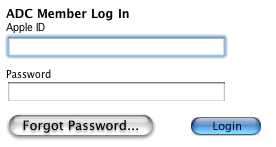
With Aqua so close to becoming part of UI history and Leopard just around the corner, bringing with it yet another completely different UI theme to OS X, it should probably not be surprising when Apple’s own Developer Connection web site sports such an inconsistent look. The UI ghosts of yesteryear are still around!

comments

Download Spinalonga's Podsafe rock music for your podcast. From Athens, Greece, with love.'